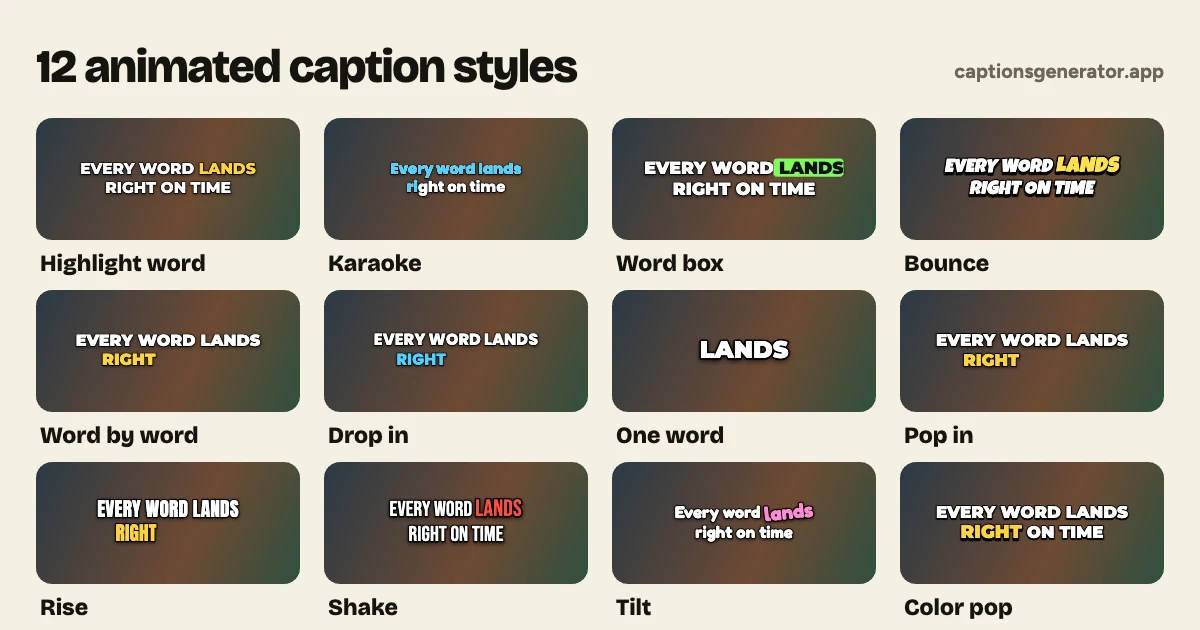
Highlight word
The word being spoken lights up in your color.
Animated captions, also called animated subtitles or dynamic captions, move or change color word by word as each word is spoken. Upload a video, AI times every word, and you pick how it moves: highlight, karaoke, bounce and four more. Try each one on your own video, with no sign-up.
No sign-up needed
Try it on the demo
Each one follows the voice word by word. Put any of them on any caption style, in your own colors.
The word being spoken lights up in your color.
Color sweeps through each word as it’s said, like the lyrics on a karaoke screen. These are the classic karaoke captions.
A colored box jumps from word to word, like a highlighter.
The spoken word grows and pushes its neighbours aside.
Words appear one at a time, so nobody reads ahead.
Each word falls into place with a small bounce.
One big word on screen at a time, for fast cuts.
On the free plan a whole line can pop, fade or slide in. Word animations can be tried free and need Pro to export.
Compare the plans →Each word gets its own start and end, so the highlight lands on the voice, not near it.
Correct a name or a brand in the editor before you export. The line keeps its start and end.
Set the highlight to your brand color, change the font and drag the captions where they fit.
Your video is never uploaded, so no one else can see it. Only the audio is sent to make subtitles, and we don’t keep it.
Just need the subtitle file? Video to SRT →
Most people scroll with the sound off. A moving word gives the eye something to follow. Check the safe zone →
Karaoke-style captions let viewers follow a long answer word by word.
One big word at a time makes the first three seconds hard to skip.
A highlighted word keeps a single shot from feeling still.
$0
No sign-up
Downloads
Editing
Translation
$4.92/month
Billed $59 yearly · Cancel anytime
Everything in Free, plus
Downloads
Editing
Translation
14-day money-back guarantee How it works
Captions where each word moves or changes color at the moment it’s spoken, instead of a whole line sitting still. They’re also called animated subtitles, dynamic captions, word-by-word captions or karaoke captions.
None. Apps use different names for the same thing: captions that follow the voice word by word. “Karaoke captions” usually means the kind where color sweeps through each word.
You can try every word animation on your own video for free, with no sign-up. Exporting a video with a word animation needs Pro. On the free plan, your first video (up to 30 minutes) exports as a 1080p MP4 with a watermark in one of the 8 free styles; their lines can still pop, fade or slide in. See what each plan includes
Seven: Highlight word, Karaoke, Word box, Bounce, Word by word, Drop in, One word. 14 ready-made styles use them, and you can put any animation on any style.
Upload your video, open the Animate tab and pick Karaoke. Color then sweeps through each word as it’s sung or said. Change the sweep color with the highlight color.
No. It runs in your browser, with nothing to install and no keyframes to set: the AI times the words and the animation follows them. You download a finished MP4 that you can still bring into any editor.
The AI gives every word its own start and end time, so the animation follows the voice. When you edit a line, it keeps its start and end, and its words are spaced across that time.
Yes. Pick the highlight color, the text color, the outline and one of 15 fonts, and drag the captions where you want them. Pro also takes your own font files and saves your styles.
Yes. You download an MP4 with the captions in the picture, so it plays the same on every app. On vertical videos the editor can show each app’s buttons, so no word ends up under them.
An SRT file has a time for each line, not for each word, so its lines can pop, fade or slide but words can’t animate one by one. Upload the video itself and the AI times every word.
Try every animation on your own video. No sign-up, no card.