The fastest caption generator? We timed 10 tools on the same video
By Ian · · 6 min read
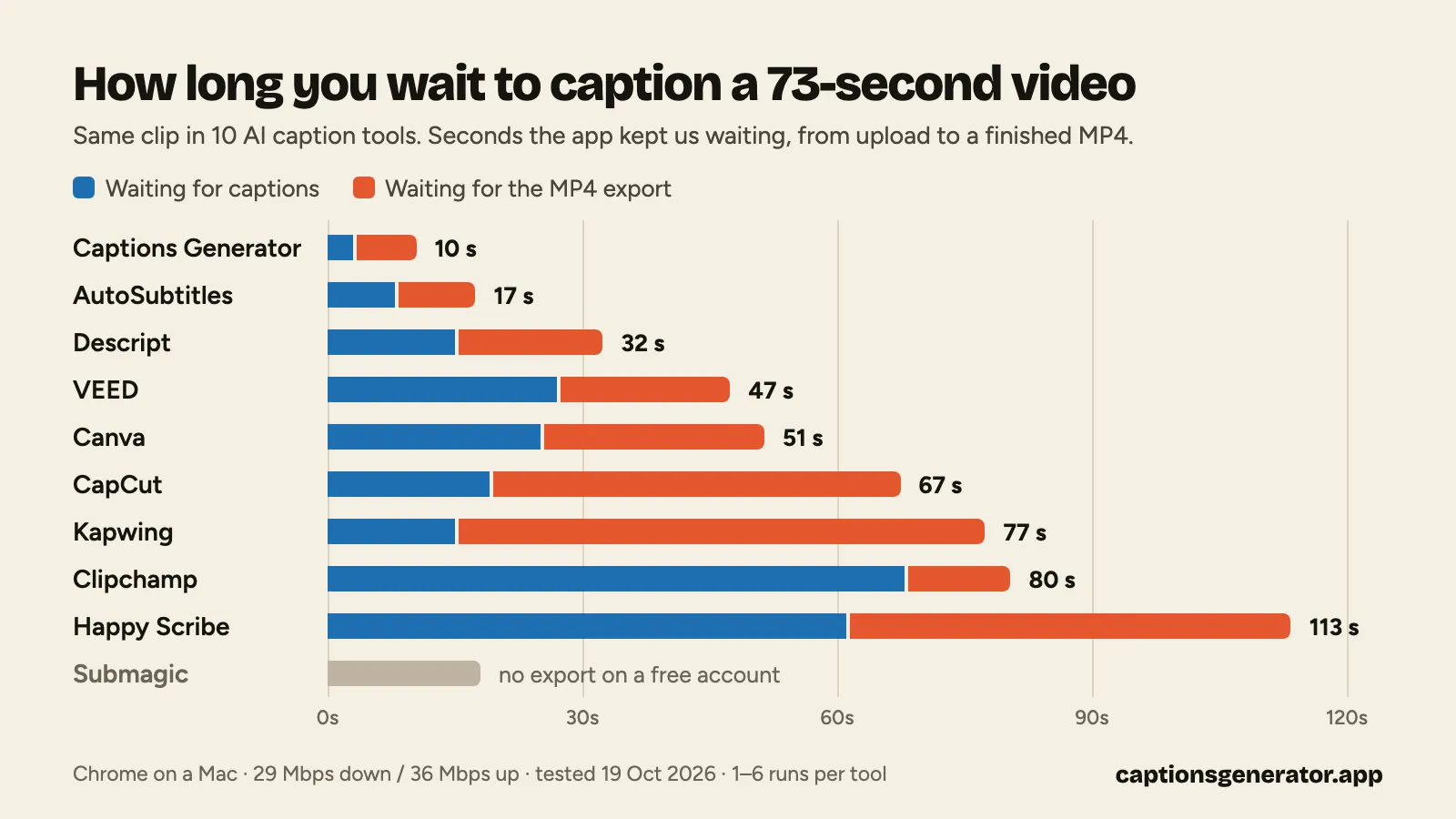
We put the same 73-second video through 10 AI caption tools and timed every second we spent waiting. The fastest, Captions Generator (the tool I make), gave us a finished, captioned MP4 in 10 seconds, with AutoSubtitles next at 17. Happy Scribe was slowest at almost two minutes, and Submagic wouldn't export on a free account at all.
Accuracy didn't separate them: no tool made more than two mistakes in 168 words. The time went to exports, upload screens and the steps in between.
Tested on October 19, 2026 in Chrome on a Mac. Free plans for every tool; mine has the same transcription and export on its free plan.
Results: 10 caption and subtitle tools timed
Seconds the app kept us waiting from upload to a finished MP4, then split into waiting for the captions and for the export. Each number is the median of that tool's counted runs (one to six runs, all in the CSV), and clicking time isn't included.
| Tool | Total | No watermark | Captions ready | MP4 export |
|---|---|---|---|---|
| Captions Generator | 10 s | ✓ | 3 s | 7 s |
| AutoSubtitles | 17 s | ✕ | 8 s | 9 s |
| Descript | 32 s | ✕ | 15 s | 17 s |
| VEED | 47 s | ✕ | 27 s | 20 s |
| Canva | 51 s | ✓ | 25 s | 26 s |
| CapCut | 67 s | ✓ | 19 s | 48 s |
| Kapwing | 77 s | ✕ | 15 s | 62 s |
| Clipchamp | 80 s | ✓ | 68 s | 12 s |
| Happy Scribe | 113 s | ✕ | 61 s | 52 s |
| Submagic | – | – | 18 s | Paid only |
Where the time goes
Waiting for captions: 3 seconds to over a minute
Six tools had captions on screen in under 20 seconds: Captions Generator (3 s), AutoSubtitles (8 s), Descript and Kapwing (15 s), Submagic (18 s) and CapCut (19 s). The two fastest pull the sound out of the video in your browser and upload only that, so a big phone video doesn't have to travel first.
The rest kept us waiting longer:
- Clipchamp took about 68 seconds after "Transcribe media", every run.
- Happy Scribe took 40 seconds to almost 2 minutes after the click, plus a 7-second upload. Its file list doesn't update on its own, so you reload the page to find out it's done.
- VEED swung from 14 to 52 seconds across three runs, with an upload screen before you can start.
- Canva keeps "Generate captions" locked until the upload finishes, about 15 seconds.
Fixing words: a tie
No tool made more than two mistakes in 168 words, so the fixing takes seconds anywhere. The slips landed in three places:
- A name. "Hague" became "Haig" in VEED and Canva, and "Head" in CapCut.
- A small word in the last sentence. Descript heard "journey in achieving it" for "journey and achieving it".
- The music at the end. AutoSubtitles added "Sam." and Happy Scribe added "Thank you." to a part with no speech.
Style differs more than accuracy. CapCut leaves out punctuation, Submagic adds emojis, and Kapwing splits the clip into 1–2-word captions.
Exporting: 7 seconds to a minute
The export is where most of the gap opens up. Captions Generator (7 s), AutoSubtitles (9 s) and Clipchamp (12 s) were done while Kapwing (62 s), Happy Scribe (52 s) and CapCut (48 s) were still on their progress bars.
Those three fastest render the video right in your browser tab, so there's no server queue and no download wait. CapCut's 48 seconds include downloading a 57 MB file. Kapwing walks through a five-step progress bar that took a full minute.
The detours that cost more than seconds
- A paywall at the last step. Submagic transcribed and styled our video, then showed "Your video's ready — upgrade to export." Its Starter plan is €12 a month billed yearly, or €19 month to month.
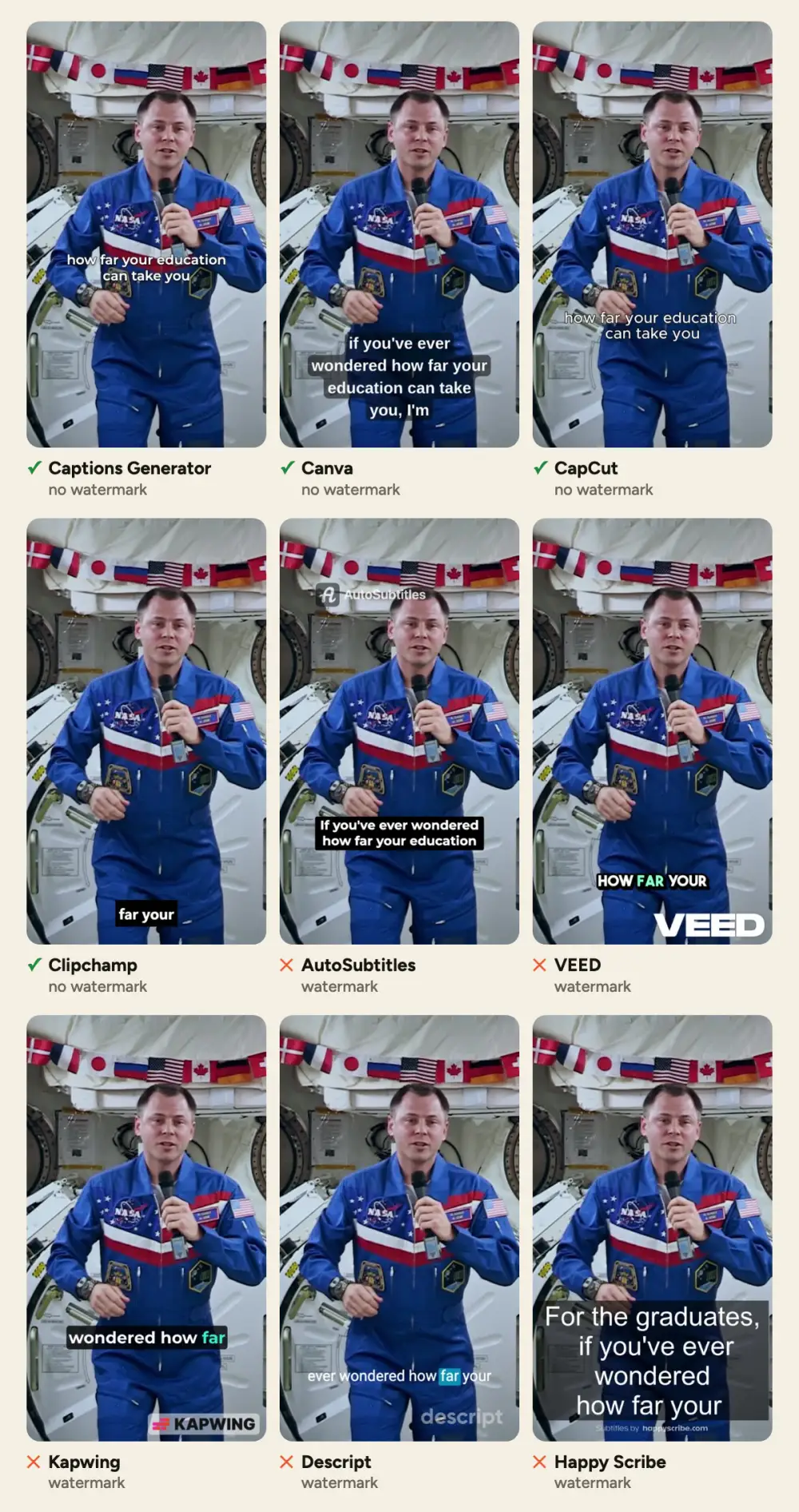
- Watermarks. Five of the nine free exports carry a logo; removing it means paying and exporting again. (AutoSubtitles' simpler editor exports without one, at 480p; we used its main editor.)
- Extra screens. VEED showed two pop-ups after one of our two exports. Kapwing and Clipchamp asked us to rate them. Descript opens with five setup screens the first time, Submagic with a short survey you can skip.
- Defaults that cost clicks. Descript exports to a web link until you switch to "Local export".
Clicks from the caption page to a saved MP4, counting the file pick:
| Clicks | Tools |
|---|---|
| 4 | Captions Generator, Canva, CapCut |
| 5 | AutoSubtitles, VEED |
| 7 | Kapwing |
| 8 | Clipchamp |
| 9 | Descript, Happy Scribe |
Which one saves you the most time?
- Short clips, free, no watermark: Captions Generator. 10 seconds in total. You need a free account, and the free plan exports videos up to 3 minutes long, 30 minutes a month.
- No sign-up: AutoSubtitles, 17 seconds. Its main editor adds a watermark; its simple editor doesn't, at 480p.
- You already design in Canva: Canva, 51 seconds, no watermark.
- You want a full editor at 1080p for free: Clipchamp. Slow captions, fast export, no watermark.
- You need a free export: Submagic's free account can't export.
Prices, free-plan limits and features of these tools are in our round-up of AI subtitle generators.
How we tested
- The video: NASA's 2019 graduation message from the International Space Station, 73 seconds, public domain. We cropped it to a 9:16 phone video (720 × 1280, 8.7 MB).
- The answer key: NASA's own captions for the clip, 168 words. Spelled-out numbers ("two hundred and fifty" for 250) counted as correct.
- No shortcuts: every caption run we counted used a fresh copy of the file, so no tool could reuse an earlier result.
- The clock: a script in the page logged when we picked the file, when captions appeared and when the MP4 finished downloading. Clicking time isn't counted.
- The setup: Chrome on a Mac in Europe, on a 29 Mbps down / 36 Mbps up home connection, each tool's default caption style. Free plans for every tool; Captions Generator has the same transcription and export on its free plan. CapCut was timed with its free online AI Captions tool; captions inside CapCut's full editor need Pro.
- Status checks: one VEED run and one Happy Scribe run had already finished when we checked, so those two numbers may be a few seconds high.
- The raw data: the timings, in seconds (CSV), including runs we didn't count and why.
FAQ
How long does it take to add captions to a video?
For our 73-second video, between 10 seconds and about 2 minutes of waiting, depending on the tool. Captions Generator (10 s) and AutoSubtitles (17 s) were the fastest from upload to finished MP4.
What's the fastest way to add subtitles to a video?
Use a tool that uploads only the audio and renders the video in your browser. In our test, Captions Generator and AutoSubtitles went from upload to a finished MP4 in 10–17 seconds. The other tools took 32 seconds to almost 2 minutes.
What's the fastest free caption generator without a watermark?
Captions Generator, in our test: 10 seconds from upload to a finished MP4, with no watermark. Canva (51 s), CapCut (67 s) and Clipchamp (80 s) also export without one.
Are AI captions accurate enough to post without editing?
Almost. No tool made more than two mistakes in 168 words, but the misses fell on a person's name, a small word in the last sentence and the music at the end. Check names and the last lines before you post.
Why does exporting take so long in some caption tools?
AutoSubtitles, Captions Generator and Clipchamp render the video in your browser and finished in 7–12 seconds. The others show a progress bar and then a download, which took 17 to 62 seconds in our test.