Closed captions vs subtitles: open captions and SDH explained
By Ian · · 8 min read
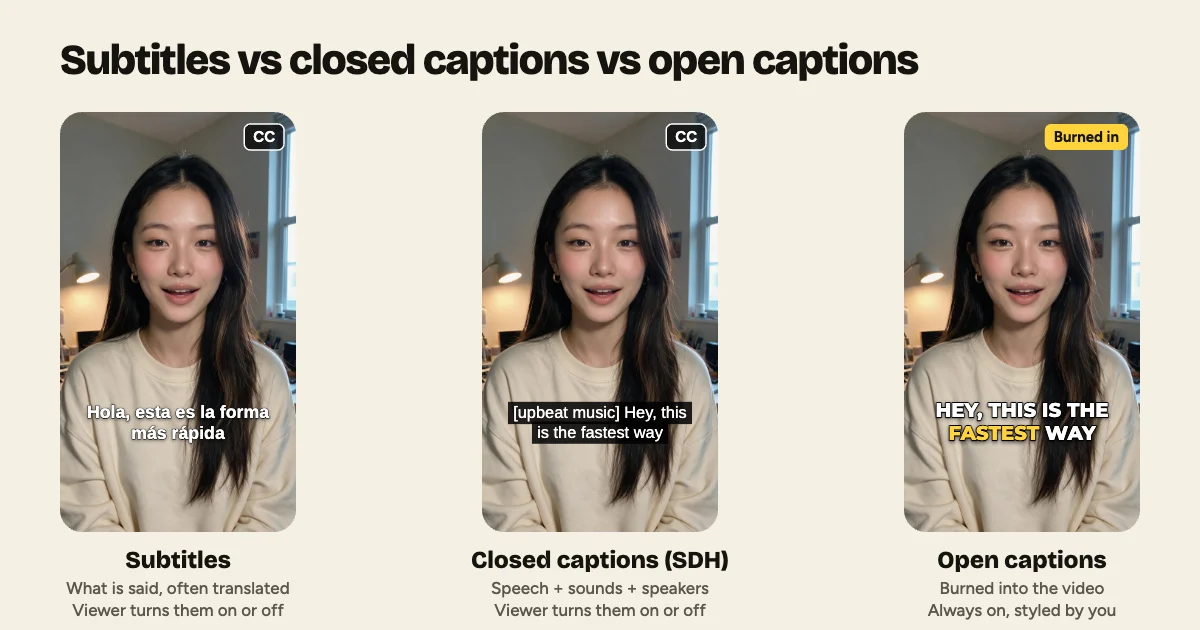
The difference is who they're for: subtitles assume you can hear the audio and show the spoken words, often translated. Closed captions assume you cannot hear, so they add meaningful sounds and speaker names while letting the viewer turn them off. Open captions are burned into the video picture, and SDH is closed-caption information delivered as a subtitle track.
Closed captions, subtitles, SDH, and open captions at a glance
Two ideas sit behind these labels: captions vs subtitles is about what is written and who it serves, while open vs closed is about whether the viewer can turn the text off.
| Subtitles | Closed captions | SDH | Open captions | |
|---|---|---|---|---|
| Written for | Viewers who can hear, often another language | Deaf and hard-of-hearing viewers, or hard-to-hear places | Deaf and hard-of-hearing viewers | All viewers (always visible) |
| What's in it | Spoken words only | Speech, sounds, speaker IDs | Speech, sounds, speaker IDs | Speech, plus sounds and speakers if added |
| Can the viewer turn it off? | ✓ | ✓ | ✓ | ✕ |
| Where it lives | Separate file or track | Separate file or track | Subtitle track on disc or service | Video pixels |
| Typical place you see it | Foreign films, YouTube | US TV, YouTube, web players | DVDs, Blu-rays, subtitle menus that list a track as "SDH" | TikTok, Reels, YouTube Shorts |
The same scene as subtitles vs SDH
Picture a two-second scene invented for illustration. A door bangs, a man named Ray calls out from off screen, and a phone rings.
As subtitles, the .srt file carries only the dialogue:
1
00:00:01,500 --> 00:00:02,500
Is anyone home?
As SDH or closed captions, the file adds the sounds and names the off-screen speaker:
1
00:00:01,000 --> 00:00:01,500
[door bangs]

2
00:00:01,500 --> 00:00:02,500
[Ray] Is anyone home?

3
00:00:02,500 --> 00:00:03,000
[phone ringing]
Each cue in a SubRip (.srt) file has a number, a timing line, one or two lines of text, and a blank line. Subtitles skip the door and the phone because hearing viewers already hear them; captions include them so the scene still makes sense without audio. Both snippets are valid SRT files: the difference isn't the file type, it's what you write inside the cues.
What are subtitles?
Subtitles put the spoken words on screen for viewers who can hear the audio but do not understand the language, or who want to read along. They are usually translations—like a French film with English text—though same-language subtitles exist too.
Because subtitles assume you hear the soundtrack, they stick to speech and leave out sound descriptions. They usually live in a separate track the viewer can toggle off, though burned-in open subtitles also exist.
What are closed captions?
Closed captions (CC) are written for deaf and hard-of-hearing viewers who cannot hear the audio. People also switch them on in places where sound is hard to hear, like a gym, a bar, or a quiet office.
Alongside speech, closed captions add sounds that matter—music, laughter, a door bang—and identify who is speaking when it is not obvious. "Closed" means the text lives in a separate track or file that the viewer turns on or off.
Open captions vs closed captions
Open captions are burned into the video and always visible; closed captions are a separate track or file the viewer can turn on or off. Open captions are also called burned-in or hard-coded captions, and there is no caption file.
Both options come with practical trade-offs:
- Control over style: Open captions are part of the picture, so they look the same on every app, in the font, color, size, and position you pick. Closed captions are styled by the viewer's player.
- Viewer flexibility: Closed captions can be turned off, resized in player settings, or switched between languages. Open captions stay on screen in one language (or two at once).
- Sharing and reposting: Open captions are part of the image, so they stay with the clip when it's downloaded, sent in a chat app or reposted. A caption file can get left behind if only the video file moves.
- Fixes after export: Updating a typo in a closed-caption file only requires editing and uploading the text file again. Changing one word in open captions means exporting the video again.
- Content: Either format can include sound tags and speaker IDs, or stick to speech. That part is your choice.
Avoid uploading closed captions for a video that already has the same words burned in, or turning them on by default. Viewers who enable CC will see the same text twice.
What are SDH subtitles?
SDH stands for subtitles for the deaf and hard of hearing. The American DVD industry introduced the term, and you'll often see it in subtitle menus as a track called "English SDH" or "English [SDH]."
SDH holds the same content as closed captions: dialogue, meaningful sounds, and speaker IDs. The main difference is how it is delivered and how it looks.
Classic US TV closed captions relied on an old broadcast signal (line 21), appearing as white text on a black band that could sit anywhere on screen. High-definition Blu-ray specs do not require support for line 21, so Blu-ray discs use SDH tracks instead. To a viewer, SDH usually looks like ordinary subtitles in the same font style as the other language tracks on the disc or service.
Common SDH conventions
Netflix's English timed text style guide lays out the SDH rules most viewers see:
- Brackets and lowercase: Sound effects and speaker IDs go in square brackets in lowercase except proper nouns, like
[horse neighs],[engine starts], or[Kimmy] Are you coming?. - Plot-relevant sounds: Include sounds that matter unless the picture makes them obvious, and describe the sound rather than the visual.
- Two speakers: When two people speak in one subtitle, start each line with a hyphen, one speaker per line, like
-[Ray] Is anyone home?on the first line and-[Kimmy] In the kitchen!on the second. - Music: Wrap lyrics in music notes with a space inside (
♪at the start and end), like♪ Walking down the road ♪, and describe background music generically, like[rock music playing over stereo].
Captions vs subtitles in the UK and US
"Closed captioning" is an American term. In British English, "subtitles" usually means subtitles for deaf and hard-of-hearing viewers.
So on UK television, pressing the "subtitles" button gives you the dialogue, sound cues, and speaker names that US viewers call closed captions.
Which one should you use?
Match the format to where you publish and who watches.
- YouTube: Upload closed captions as an
.srtor.vttfile. YouTube handles subtitles and closed captions the same way—see YouTube's list of supported caption files, which also includes broadcast formats like Scenarist (.scc) for TV and movies. Viewers can toggle them off, resize them, or switch languages. - TikTok, Reels, and YouTube Shorts: Use open captions so your style stays intact everywhere the clip is shared, reposted, or downloaded. Keep the text inside the Instagram, TikTok, and Shorts safe zone so app buttons do not cover it.
- A website or course: Use closed captions in
.vtt(WebVTT, used by web players) or.srton Vimeo or your own player so viewers can toggle, resize, or switch languages. - Translated audiences: Upload one subtitle file per language on YouTube or web players; burned-in video only fits one language (or two at once) per file.
- Deaf and hard-of-hearing viewers: Add sound tags and speaker names whichever delivery you choose. Speech-only text leaves out
[phone ringing],[sarcastic laugh]or who shouted from off screen.
Do you have to caption your videos?
In the US, Congress requires TV video programming distributors—broadcasters, cable operators, satellite distributors, and others—to close caption television programs. Under the FCC's guide to closed captioning on television, TV captions must be:
- Accurate: Match spoken words and convey background noises and other sounds as fully as possible.
- Synchronous: Stay in step with words and sounds at a readable speed.
- Complete: Cover the program from start to finish.
- Properly placed: Avoid blocking key visuals, overlapping, or running off screen.
Under the FCC's rules for internet video programming, programs shown on US TV with captions must stay captioned online—both full programs and clips on the distributor's own website or apps.
The FCC's caption rules don't cover home videos, DVDs, or video games, and under them online consumer-generated media doesn't have to be captioned unless it aired on TV with captions. Other accessibility rules can apply to schools, public bodies, and businesses, so check what applies to you. This is not legal advice.
How to make each type with Captions Generator
Captions Generator, the tool I make, helps you make each of these, with no sign-up needed. Upload a video in any of 100 languages, and the AI builds captions with word-level timing that you can edit before downloading.
- Open captions: Export an MP4 with burned-in text using your choice of fonts, colors, outlines, background boxes, placement, and animated word-by-word styles.
- Closed captions and subtitles: Use the video-to-SRT tool to download an
.srtor.vttfile for YouTube or any web player. - SDH details: When the tool hears two or more speakers, the subtitle download offers a Speaker names option that starts the line with the speaker's name (like
Ray:) wherever the speaker changes, and you can rename speakers. Prefer the bracket style? Leave Speaker names off and type[Ray]at the start of those lines in the editor. It does not add sound tags like[music]or[laughs]automatically, so type them in before downloading. - Translated subtitles: Translate your captions into 100+ languages in the editor's Translate tab (translating is free; downloading follows the same first-video rule), then download the translated
.srt. Already have an SRT file? The subtitle translator takes it as it is.
Your first video is free—the free MP4 includes a watermark, while .srt and .vtt downloads do not.
FAQ
What does SDH mean in subtitles?
SDH stands for "subtitles for the deaf and hard of hearing." It combines spoken dialogue with meaningful sound descriptions and speaker IDs in a standard subtitle track.
Are closed captions and SDH the same?
They carry the same information, but differ mainly in look and delivery. US TV closed captions traditionally appear as white text on a black band, while SDH looks like ordinary subtitles on discs and streaming services.
Are subtitles the same as closed captions?
No. Subtitles assume you can hear and show only spoken words (often translated), whereas closed captions assume you cannot hear and add sounds and speaker names.
What is the difference between open and closed captions?
Open captions are burned into the video picture and can't be turned off; closed captions are a separate file or track the viewer switches on or off. Open captions look the same on every app, while closed captions can be resized or switched to another language in the player.
Which is better for TikTok, Reels, and Shorts?
Open captions are usually better for short-form clips because your styling stays intact when videos are shared or downloaded. Place them in the safe zone so app buttons do not hide them.
What file format are closed captions?
The most common formats are SubRip (.srt) and WebVTT (.vtt), which web players use. Broadcast TV and movies also use formats like Scenarist (.scc), and YouTube supports .srt, .vtt, and several other types.